FixGuardAI
Open dashboard
2nd place · Hostinger 21-Day Startup Challenge

Stop wasting AI builder credits.

FixGuard opens your site in a real browser, submits your forms and follows every link. Each finding comes back as a prompt scoped to one element, so your builder fixes one thing instead of regenerating the page.

  • Free account
  • Nothing to install
  • Never asks for your site's password
atelier-north.example · audit
  1. open https://atelier-north.example/
  2. GET / 200 · 1.8s
  3. fill form#contact · labelled test data
  4. submit → shows "Thanks, we'll be in touch!"
  5. POST /contact 500 Internal Server Error
  6. GET /pricing 404
  7. verdict silent form failure · 2 broken routes
29saverage full audit · seven checks · one real browser
49 → 97one test site, after four scoped prompts
0invented numbers in any report

The report

Evidence, not adjectives.

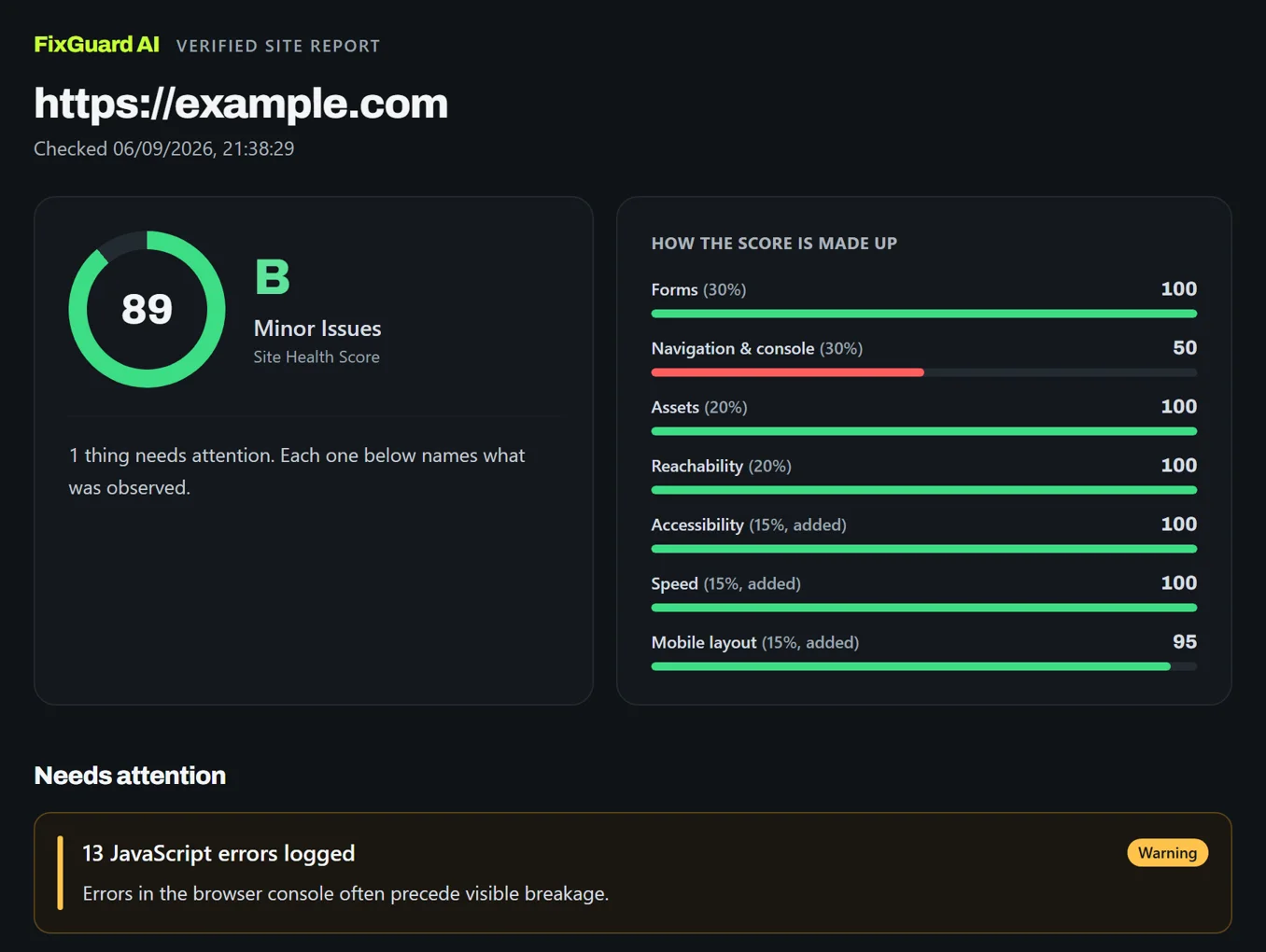
A real shared report, as a client sees it. Every lost point names what was observed and where.

  1. 1
    A score with a grade

    Out of 100, so progress is a number, not a feeling.

  2. 2
    Where the points went

    Forms, navigation, assets, reachability, accessibility, speed and mobile, each weighted.

  3. 3
    What needs attention

    Each finding in plain words, with the technical detail one click away.

Open this report →
app.fixguardai.online/r/…
A FixGuard report: score 89, grade B, minor issues; a weighted breakdown with navigation and console at 50; and one finding, 13 JavaScript errors logged.

The hidden failures

Three failures a success message hides.

The page told the visitor it worked. The network tells a different story.

Forms · silent success

The success message that means nothing.

A form can show a confirmation and send no request at all, or send one that comes back 500. FixGuard fills it with clearly labelled test data, submits it, and tells you which of those actually happened.

POST /contact → 500
form#contact → success shown, 0 requests sent

Routes · 404 · loops

Links that lead nowhere.

Every internal link is followed, not just listed. Loops, soft 404s and dead routes are named by the path a visitor would click.

GET /pricing  → 404
GET /old-blog → 301 → 301 → loop

Third parties

Everyone your visitors reach.

Every host that receives a request when someone opens your page, including the ones your scripts loaded on their own.

hosts contacted: 24
analytics · ads · cdn · fonts

Why it saves credits

A finding your builder can act on in one pass.

"Fix the contact form" makes an AI builder re-read the whole project and regenerate a section. A finding that names one element, one behaviour and the evidence lets it change one rule and stop.

  • Names the element by selector, not by description
  • Says what must not change, so the layout survives
  • Carries the request that proves the problem

What people usually paste

The contact form is broken, please fix it.

Rewrites the section · spends a credit · often breaks something else

A scoped finding illustrative

In form#contact only: the success message shows before the request finishes, and POST /contact returns 500. Show it only after a 2xx response, and an error otherwise. Do not change the layout, styles or any other section.

One element · one behaviour · nothing else touched

How it works

Four steps from address to fix.

No setup, no snippet. An address and a real browser doing what a visitor does.

  1. 01

    Paste your address

    Nothing to install on your site.

  2. 02

    A real browser opens it

    Loads like a visitor, fills every form, presses submit.

  3. 03

    A score, with evidence

    Out of 100, with the request that cost each point.

  4. 04

    A prompt per finding

    Paste it back, or hand it to whoever fixes it.

See the full How it works →

Proof

One test site, four scoped prompts.

The same AI-built site, audited before and after each finding was pasted back as a prompt. No rewrites, no redesigns: just the fixes FixGuard named.

Health score

4997

Critical findings

110

Silent form failures

30

Who it is for

If it looks done but has to work.

AI builder users

Pre-flight before you share the link.

Catch the form that says Thanks! while sending nothing, before anyone else sees it.

Freelancers and agencies

Hand over proof, not a thumbs-up.

A PDF certificate, a client-safe link and a before-and-after that lands with the invoice.

Clients reviewing a build

An independent score before you accept.

The report names the path and the selector, so the fix is not a matter of opinion.

FAQ

Questions you should ask.

Straight answers, in the same words the reports use.

See every question →
Does FixGuard install anything on my site?

No. There is no snippet, tag or agent to add. FixGuard loads your site in its own browser the way a visitor would. Nothing changes on your end.

Does it need my password?

Never. To check pages behind a login you sign in yourself and hand FixGuard the resulting session, which is scoped, expiring and revocable. Forms containing a password, card or ID field are never submitted.

How long does an audit take?

Around 30 seconds for a single page with the seven default checks. Following your sitemap and internal links takes longer, in proportion to how many routes it finds.

Can it verify the email actually arrived?

No, and it will not claim to. FixGuard sees whether your form's request left the page and what came back. The mail your host then sends goes to you, not to FixGuard.

Is my audit private?

Yes. Audits stay private to your account. Shareable links expire on a schedule you set, and no cookie or token values are ever stored.
Ready when you are

Find out before your customers do.

One URL and a free account. No snippet, no card.